
05Local-First Chrome Extension

FormatClip

A local-first Chrome extension that reformats selected text through an explicit, user-triggered workflow and a typed FastAPI backend.
  • Chrome MV3
  • WXT
  • React
  • TypeScript
  • FastAPI
Ownership
Owned project
Timeline
August 2026
Status
v1.0.0 public release
FormatClip
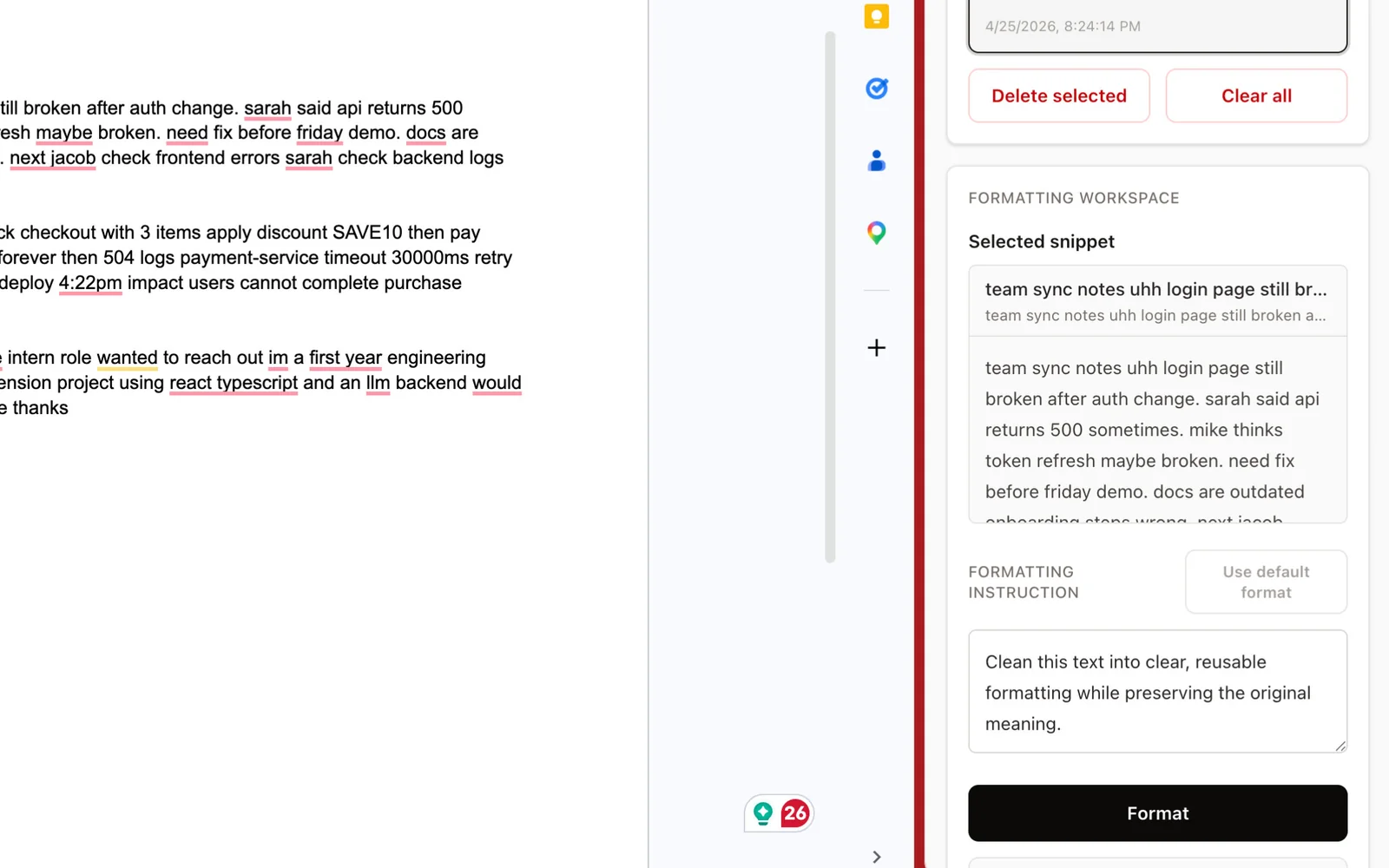
FormatClip Chrome extension side panel showing a saved snippet, a formatting instruction, and the explicit Format action.

Local-first extension workflow; external providers receive only explicitly submitted text when configured.

Overview

Uses a minimal-permission Manifest V3 extension, local settings, bounded backend contracts, and optional OpenAI or Groq providers to transform only text the user chooses to send.

Problem

Text copied from websites often carries formatting, spacing, or structure that does not fit the destination. A useful formatter should be fast and intentional without silently collecting browsing history, requesting broad permissions, or requiring a hosted account.

My role

Designed and implemented the extension UI, local configuration flow, typed API boundary, provider adapters, deterministic development mode, validation, accessibility details, tests, release packaging, and public documentation.

System architecture

Select

User selection

Action

Explicit action

UI

Local extension UI

Storage

Local settings

API

Typed API

Provider

Provider adapter

Result

Result

Release

Release pipeline

What I built

  • Manifest V3 browser extension built with WXT, React, TypeScript, and Tailwind.
  • Side-panel interface for saving, selecting, formatting, replacing, deleting, and clearing reusable text snippets.
  • An explicit “Format” action; no passive capture of page contents.
  • Local snippets and settings stored with chrome.storage.local.
  • Minimal browser permissions appropriate to the checked-in extension.
  • FastAPI backend with typed request/response contracts and bounded inputs.
  • A deterministic mock provider for local testing.
  • Optional OpenAI and Groq provider adapters.
  • A loopback/local backend as the default development boundary.
  • Error and loading states, plus documented keyboard and accessibility behaviour.
  • Automated backend and extension tests, bundle-size checks, and reproducible packaging.
  • A tagged v1.0.0 GitHub release.

Technical decisions

  • Manifest V3 and a minimal-permission design.
  • An explicit formatting action instead of background monitoring.
  • chrome.storage.local for user-controlled settings.
  • Typed request/response validation at the FastAPI boundary.
  • Bounded input sizes and predictable error states.
  • A provider abstraction so deterministic mock behaviour and optional real providers share one contract.
  • Loopback-first configuration, rather than pretending a hosted service exists.
  • Release checks that include tests, build output, and bundle budgets.

Testing and validation

  • 26 backend tests and 5 extension tests in the current public project evidence.
  • Bundle-size budgets enforced as part of release packaging.
  • A documented mock-provider path so the extension can be exercised with no external provider.
  • v1.0.0 archive size 77,949 bytes; SHA-256 e4429155f35d633f9c1af32668887e1b896dd1b42d45d45acbbda57406d95436.

Measured evidence

  • 31

    Automated tests (26 backend, 5 extension)

    Latest successful main-branch CI run 31925733707 (2026-08-16): 26 backend tests plus 5 extension tests; rechecked 2026-08-18.

    Point-in-time count, not a live counter.

  • 77,949 B

    v1.0.0 release archive size

    Verified size of the published v1.0.0 release asset, dated 2026-08-16.

    Release archive size, not the installed browser footprint.

  • 2

    Browser permissions requested (sidePanel, storage)

    Counted from the manifest in the tagged v1.0.0 source, plus the documented local backend origins.

A compact, installable v1.0.0 extension with a deliberate privacy boundary, deterministic local testing, optional provider integrations, and automated package checks.

Limitations

  • No verified Chrome Web Store listing.
  • No hosted multi-user product or account system.
  • No claim of user count, adoption, revenue, or productivity improvement.
  • External model providers receive selected text when the user enables them.
  • The default local/loopback workflow requires the backend to be available.
  • Browser compatibility claims are limited to what is documented and tested.

Technology stack

  • Chrome MV3
  • WXT
  • React
  • TypeScript
  • Tailwind CSS
  • FastAPI
  • Python
  • Local-First
  • LLM Integration

Data and privacy

FormatClip is designed around explicit user action and local snippets and settings. It needs no account or hosted service, and the verified release contains no analytics or telemetry. If a user configures an external model provider, the selected text is sent to that configured provider for processing — so this is not an “all data stays on device” product.